ALERT: Misspelling in fake Microsoft email tricks users into clicking scam link
What’s happening
People are getting fake password reset emails that look like they’re from Microsoft (but are actually from a scammer).
The point of the email is to get you to reset your password by clicking a link. The email is designed to look exactly like a legitimate Microsoft password request email.
What to do
If you get a password reset email out of the blue, I hope your first thought will be, “Wait a minute, I didn’t submit a request to reset my Microsoft password. Hmmm…suspicious.”
And if your second thought is, “I don’t click links in emails, so even if it’s real, that’s irrelevant,” that’s even better.
But of course you are curious. If you didn’t request a password reset, why is Microsoft sending one to you?
So you switch into detective mode. And you’ll be surprised to find, after checking to see who really sent it, that the email looks like it actually did come from Microsoft.
(Note that in this example we don’t have a screenshot of the email’s headers, which would provide important clues for our investigation. All we can do with the info we have is assess the sender’s name and email address. We’ll learn about headers later, so don’t worry if you have no idea what I’m going on about. Our focus here is on identifying obvious scam email addresses.)
Let’s take a look at the email:
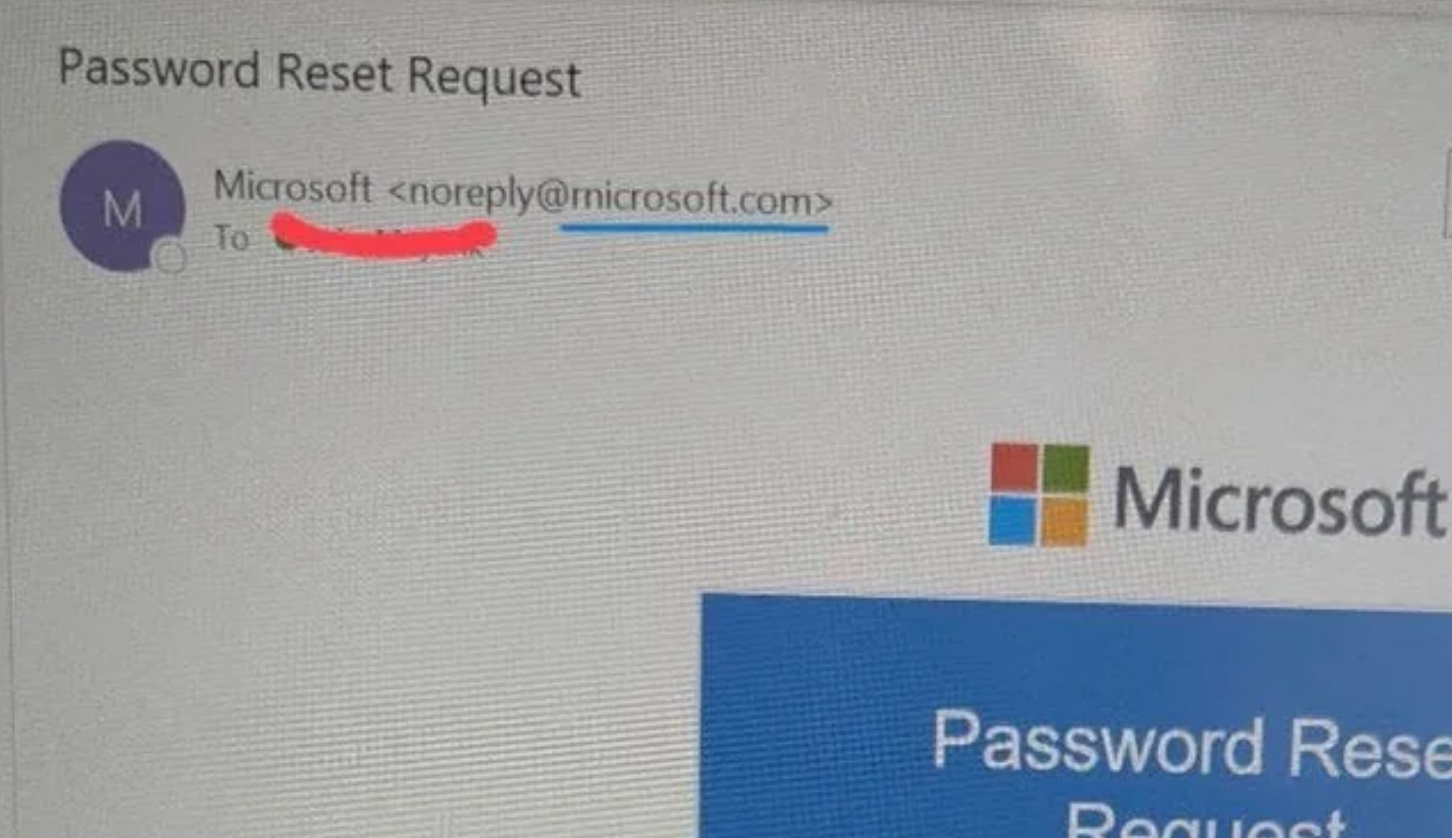
The sender is saying their name is “Microsoft,” which doesn’t help us because a sender can use any name they want here.
Now let’s check the email address:
As you can see, the sender’s email address appears to be:
Microsoft <noreply@microsoft.com>
But (and this is a gigantic but) — if you zoom in you will see that the email address actually says:
Microsoft <noreply@rnicrosoft.com>
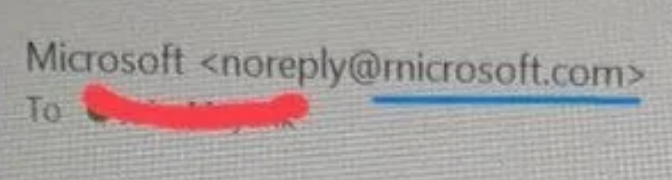
It’s difficult to see in this image, partially due to the quality, but mostly due to the font — and that’s how they get you.
The “m” in microsoft.com is not really an “m.”
This so-called “m” is actually a “r” cozying up to an “n” to trick you.
Yes, the “rn” is masquerading as an “m.”
Fake Microsoft emails coming from “rnicrosoft.com” aren’t new. They circulate for a while, disappear, then resurface in waves, hitting the inboxes of fresh victims.
Because it seems that a new wave is happening now, I wanted to warn you.
And remember: If you establish a practice of never clicking on links or attachments in emails (especially emails that arrive unexpectedly), you are amazing.
Until next time,
Love Auntie Scam
