Searching for victims: how criminals use Google search results to scam you
By Auntie Scam
I’m writing this to warn you.
In 2025, Google search is no longer safe to use in the way you used it in the past.
If you search for something on Google and click on a link — including the very first link in the search results, and links that are “sponsored” by Google — you could end up connecting with a scammer.
A scammer who might drain your bank account.
Yes, an innocent Google search can make you homeless.
As dramatic as this sounds, it’s 100% true. Oh and, in case you are wondering, Google won’t cover your losses — even if one of its trusted “sponsors” turns out to be a straight-up criminal.
Why not, you ask?
Because it’s your responsibility — after conducting an in-depth cybersecurity analysis — to determine which Google search results are safe to click on.
But I’m not here to criticize Google.
I’m here to help you understand: 1) exactly where the danger lies, 2) how to avoid the traps that criminals have set — traps that are out there waiting for you right now.
Let’s start with a bit of history. (If you find history tedious, skip this section — it’s just for background, to help you see the extreme differences between then and now.)
In the beginning
When Google started its search engine out of a garage over 25 years ago, it quickly become the standard way to find information. Unlike its competitors, it was fast, simple and ad-free.

Google founders Larry Page and Sergey Brin in their garage-office in 1998.
The company’s motto, “don’t be evil” was the driving force behind the way Google search worked. As a user you could feel it. The idealism, the good intentions.
When Google started incorporating ads in the year 2000, they were unobtrusive and sometimes even helpful. Search worked perfectly. Seeing ads on the sidelines felt more than fair. It was obvious that Google genuinely cared about its users.
In 2015, Google changed its motto from “don’t be evil” to “do the right thing.” At first glance, the updated version seems to express the same idea — just with a hint of corporate blandness. At the time, I thought nothing of it. Becoming boring is part of the natural success cycle.
But in retrospect, the revised motto feels like an early sign of Google’s eventual failure to serve its users. “Don’t be evil” is a precise directive. We understand exactly what it means. Religions codify lists of what not to do for a reason.
In the context of Google, “being evil” might mean weaponizing private data. Or prioritizing the desires of advertisers over the protection of users. Or, in 2025, evil might refer to the practice of allowing criminals to use Google search as a vector for scamming.
In contrast, “doing the right thing” feels highly subjective. When faced with an ethical dilemma, the correct course of action depends on your perspective. If you’re an executive at Google, “the right thing” might mean “optimize for short-term profits.”
If you’re a user, you just want to be able to click on a Google search result without entering a pathway to losing your life savings.
How Google won
If you weren’t an early use of Google, you might be surprised to know that Google’s main differentiating factor was ad-free simplicity. Its competitors at the time all sucked in exactly the way Google sucks now. That’s why Google won. This internet directory listing from 1999 describes Google as a “pure search engine.” And it really was.
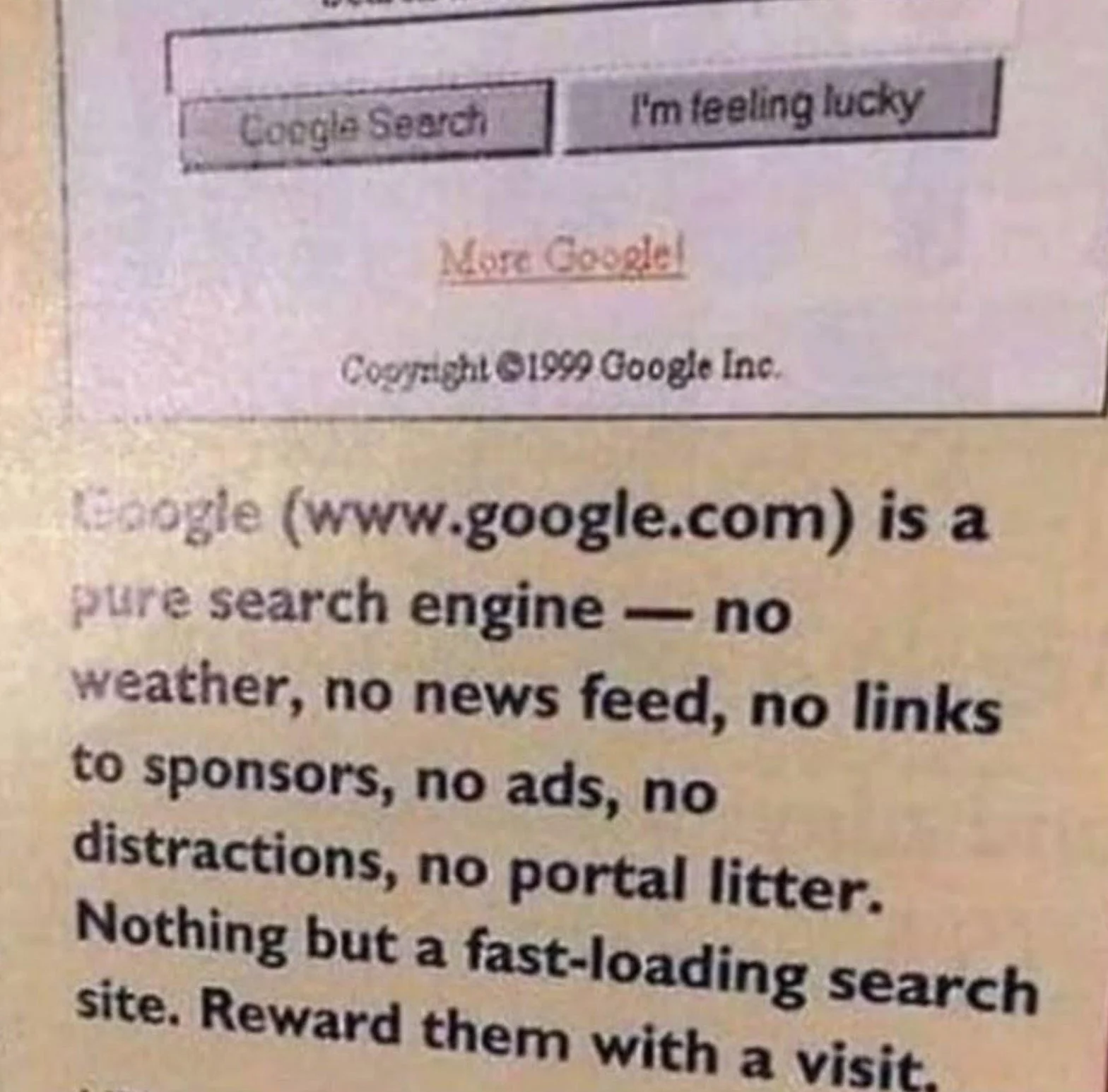
Thanks for joining me on this nostalgic journey. I hope you appreciate the term “portal litter” as much as I do. Now let’s figure out how to proceed.
What to watch out for in 2025

Let’s start with going over how a typical search might play out:
You go to Google and enter a search term like Chase login, TD online banking, Microsoft tech support, or Amazon help phone number. Then, a millisecond after the results appear, you click on the first link that looks correct, assuming that Google shows the safest and most official result at the top.
It’s quick, it’s easy, and it works — until you end up on a scam site.
It’s Not Your Fault
Just to be clear, the problem isn’t that you’re using the internet wrong. It’s that scammers have become much more sophisticated — especially since the early years of the pandemic. Scammers understand our all-too-human vulnerabilities, they know how we use the internet, they’ve figured out the best ways to trick us.
The scam industry’s estimated global size is now $70-100 billion, which rivals that of the global illicit drug trade. And scammers are all in.
How they get you
Scammers buy ads on Google and set up fake websites that look exactly like the authentic ones. Their goal is to appear first, hoping you’ll mistake their imposter site for the real thing.
This strategy works because most people (especially those of us who started using Google during its “don’t be evil” era) don’t look closely at web addresses. You trust the top position in Google’s search results. And click with confidence.
Why wouldn’t you? Search has always worked this way in the past. You can’t live your life in a cloud of suspicion. Plus, the whole reason Google exists is to provide relevant links you can trust. Right?
Sadly, in 2025, some of the top Google results are scam websites.
These sites exist for one reason: to steal your passwords, banking logins, or your entire identity. Others list fake customer service numbers, where scammers wait to take your call.
How criminals use Google to find victims

Scammers who take advantage of vulnerabilities in Google search have a whole arsenal of tactics to trick you. Here are the most dangerous ones:
TACTIC 1: Sponsored scam ads
When you search for something on Google, you’ve probably noticed that results at the top of the page say “sponsored.” The use of the word “sponsored” seems to imply that Google has vetted the company in question and deemed it safe.
But that’s not actually true.
When you see the “sponsored” tag, this just means the company paid Google to show its website first. In most cases, legitimate companies buy ads to promote their products.
But anyone can buy ads — including scammers. In fact, Google says it blocked or removed over 206 million sponsored ads in a 12-month period for breaking rules related to scamming. Who said crime doesn’t pay?
How scammers use Google
As I mentioned above, scammers love to create imposter websites. Let’s say a scammer makes a site that looks exactly like your bank’s site. Then the scammer pays Google to push the link to their fake site high up in the search results whenever someone searches your bank’s name along with terms like “customer service,” “phone number” or “login.”
Because the imposter site looks official and shows up at the top of the search results (as sponsored links do), you might click it without realizing it’s fake — even though the website address is not quite right. If you log in to your account on the fake bank site, you may unknowingly hand over your username, password, and personal info.
WARNING: A sponsored scam website might show up higher in Google’s search results than the real site it’s pretending to be.
That’s why clicking on sponsored links is so dangerous.
If there’s been a data breach at your bank, criminals can buy your phone number, full name, date of birth, transaction history, and other personal info on the dark web.
Using this info, a scammer might trick you into giving her access to your account via two-factor authentication. For example, let’s say a scammer calls from your bank’s number (or at least that’s the number that shows up on your caller ID). She tells you the bank has detected fraudulent activity on your account. Then she sends you a code and asks you to read it back, which you do. And before you realize what’s happened, your money is gone.
Will your bank compensate you for your loss?
If you shared your password or verification code with a criminal posing as a manager from your bank’s fraud department, it’s unlikely (in most countries). From the bank’s perspective, it’s your fault that a professional cybercriminal tricked you.
TACTIC 2: Imposter websites that look like real sites
Scam sites also show up in Google’s regular (also known as “organic”) search results. Which means sites without the “sponsored” tag, can still be dangerous.
Just like “sponsored” sites, sites that appear in organic search results often have website addresses that are deceptively similar to the sites they are impersonating. Scammers hope you won’t notice that the website address is wrong. Clicking the link is your first step into their trap.
Let’s look at some examples using Apple’s website.
(In the examples below, you’ll notice that I put square brackets [.] around the dot in the website address. This is to stop web crawlers from logging potentially malicious sites as valid. None of these sites are currently accessible at the time of writing, but please do not visit them, just in case. I’m including them to show you examples.)
Apple’s real website address is: apple.com
The real Apple store is at: apple.com/store
Example of a fake Apple store site: apple-store[.]com
Example of a fake Apple store site: shop-apple[.]com/store
The real Apple store in Canada is at: apple.com/ca/store
Example of a fake Canadian Apple store site: apple-store-ca[.]com
Example of a fake Canadian Apple store site: apple-ca[.]store
Example of a fake US Apple store site: apple.us[.]com/store
Real Apple support is at: support.apple.com
Example of a fake Apple support site: contact-us-apple[.]com/support
Example of a fake Apple support site: apple-support[.]com
Example of a fake Apple support site: apple.getsupport[.]com
I’ll write a future article on how to identify imposter website addresses. But, for now, let’s not worry about the details. If you find it hard to see the difference between these fake Apple sites and the real ones (and, trust me, most people do, regardless of age), I hope you’ll think twice before clicking on a Google link — especially if you’re planning to log into an account or buy something.
Real World Example
In this recent example shared online, a user wanted to update their existing car insurance plan with Geico. So they used Google to search “call Geico”.
Though Geico’s real website is geico.com, the official site makes no appearance in Google’s top sponsored results for “call Geico”.
Here’s what showed up instead:
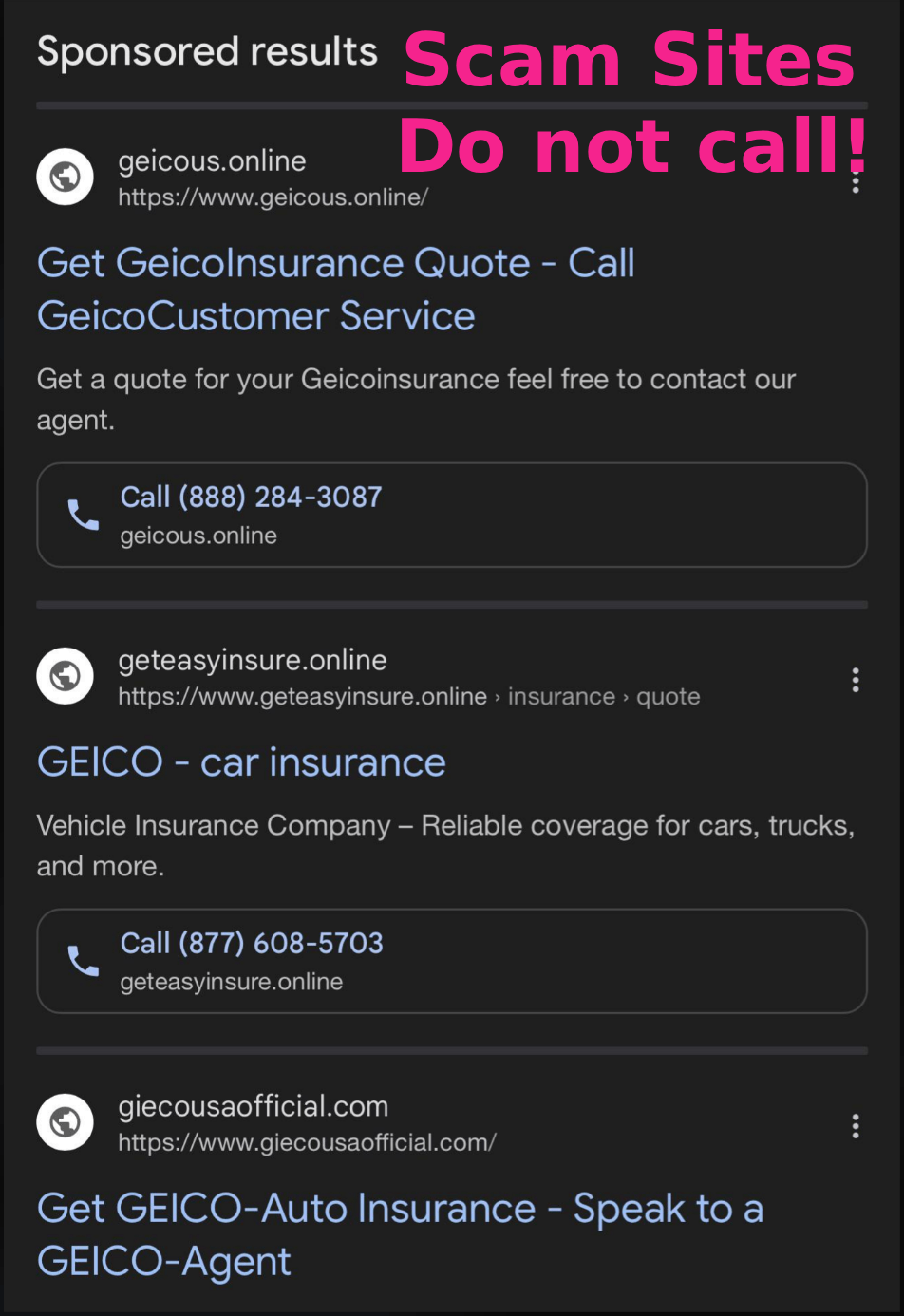
As you can see, every single one of the top sponsored results for “call Geico” in this case links to a scammer. Yes, it’s surreal, but these are the times we live in.
It’s not because you’re older — it’s because you’re human
Unfortunately, the young and tech-savvy user in our example called the first number on Google’s list and spoke to a scammer from Fake Geico, who changed their password and locked them out of their account.
Scam sites can look authentic
Scam sites lure people in because it’s easy to click on an imposter Google link when you don’t have the real website address in front of you to compare it to.
Scam sites may contain logos, brand colors, and login boxes that you recognize from the real site. Now, with the help of AI, even low-effort scammers can create a fully functioning replica of your bank’s website with a few clicks. Which means it’s now very difficult to detect a scam site just by looking at its content.
Here’s a user whose younger middle-aged dad was scammed this way:

It can happen to anyone. If you don’t check the website address (and check it again), you might accidentally enter your login credentials or financial info into a scam site.
TACTIC 3: Small businesses that appear to be legitimate but are not

Because Google uses automated systems to rank pages, fake small businesses and predatory middlemen can sometimes organically climb into the first page of search results without buying ads. Sites like this blend in because they don’t have “sponsored” tags.
From your point of view, the scam website looks like a normal business. You buy a product or call the number and book a service, thinking you are dealing with a legitimate local company.
Sometimes the company is completely fake
In this scenario, you buy a product on a website or book a service, and pay in advance. After you pay, you might hear from the business initially. But the service is never delivered, or the product never arrives, and the company disappears.
These fake companies often shut down quickly and reopen under a new name.
Sometimes the company is real, but its services are being sold by a predatory middleman
This is especially common when you’re searching for services like towing, locksmithing, and home repairs.
Here’s what might happen:
You search Google and click what looks like a local business website.
You dial the contact number, thinking that you’re calling the business.
Instead, you are speaking to a middleman at a call center, which is often overseas.
The person on the phone takes your details and connects you with 1) a contact at a real local business — who may or may not have authorized the middleman, or 2) an hourly worker the middleman finds by advertising locally (you have no idea who you’re getting).
In both scenarios, the price you pay is much higher (often double or more) than what you would have paid directly to the local business or worker without the middleman stepping in.
This “arbitrage opportunity” exists because an industry of small business brokers figured out how to game Google’s system. They use sophisticated tactics to push their middleman websites high up in search results, tricking Google’s algorithm into giving their sites more visibility than the websites of the real brick-and-mortar companies you’re trying to find. Small businesses (especially old school contractors who may not have much of a web presence) often don’t have the knowledge or the time to compete.
While middleman tactics are not always illegal, the practice is deceptive, ethically questionable, and adds a finder’s fee to the cost, usually without telling you.
To understand how truly bizarre this practice is, imagine explaining it to a child:
Surreal Bedtime Story
Tonight’s fascinating bedtime story is: How to Call a Towing Service.
Oh no, our car hit a tree! Luckily no one’s hurt, but we need a tow truck.
Here’s what to do: go to Google, search “tow truck near me,” and call what appears to be a highly-rated local company.
On the other end of the line, a middleman call center employee in a distant country (who knows nothing about towing vehicles, is not familiar with your area, and does not work for a tow truck company) will embark on an enthusiastic mission to find you a tow truck.
One small problem: due to this middleman’s predatory practices, many of the best tow truck companies in your town refuse to work with them. So it might take a few hours.
Oh, and it will cost twice what the real towing company a few blocks away would have charged if you had figured out how to call them directly. Because the middleman company needs their cut.
And that’s the end of the story. Hope you have a good sleep!
TACTIC 4: Fake phone numbers in search results
If you started using search engines during the high-trust era of the internet, you probably think of Google as a digital Yellow Pages.
You search “Name of Company customer service” and Google gives you a number. If you call the number Google gives you, that number is safe.
When the person who answers says, Hello, this is Friendly Helper from the name of the company you searched, there’s nothing to worry about. It’s okay to share your info. Because Google gave you this number, it’s the top search result, and Google knows everything.
This used to be true. But, just like website links, you can’t trust the phone numbers Google gives you anymore. (Which is very sad.)
WARNING: In 2025, calling a number you find via Google is a potentially life-destroying mistake. *
That’s because scammers manipulate Google search by posting fake phone numbers on websites, social media and forums, and by purchasing ads. Google’s AI search results (or any info you get from an AI tool, including ChatGPT) might also contain scam numbers.
If you call a scam number, the person who answers is a criminal pretending to be a support agent. They might:
Ask for your passwords or security codes.
Ask you to install remote access software, often worded as setting up “secure access to their server” (so they can “fix” your computer).
Ask for payment via gift cards, crypto or wire transfers. They may even ask you to mail cash or send an “employee” to your home to pick it up.
If you follow their instructions, they can steal your money or take control of your device.
* A Note on “Mistakes”
If you make a “mistake” like this, it’s not your fault — it’s a systemic, Wild-West-of-the-internet type problem that we, as a society, have not figured out how to fix yet.
Likely this will be solved at some point.
But until then, it’s considered your mistake. Because the onus is on you to protect yourself.
If you get scammed due to calling an imposter number surfaced by Google, it’s unlikely you’ll get your money back. People have lost their entire life savings this way.
I don’t enjoy scaring you. But please, be afraid.
Why Google allows this to happen

I’m sure you’re thinking: Why would Google, one of the most trusted sources of information on the internet, allow scam ads or fake websites in its results?
Great question. I wish I knew too.
I’ve looked into it, and yes, there are “reasons.” But are these reasons acceptable? Let’s explore:
Google’s ad purchasing process is automated.
Google runs one of the largest advertising platforms in the world. Millions of advertisers use it. The system relies heavily on automation, which means that most ads you see are approved by algorithms — not humans.The logic here is “we have so many advertisers we couldn’t possibly use humans to authenticate every one — we’d have to pay them.” In common parlance, this is known as the “think of the shareholders” excuse.
Scammers are fast and clever.
Most scam ads don’t last long. A scam ad slips through Google’s automated system, is approved, and might run for a few days, or even just a few hours. By the time users report the ad and Google removes it, scammers already have their money. All they need to do is create a different site, buy new ads, and they’re back in business.Google’s priority is “relevance,” not safety.
Google’s search algorithm tries to match your query to “relevant” results. Relevance doesn’t always equal safety. That’s why a fake site with the right keywords sometimes appears before the real one.Sponsored results may look official, but they aren’t actually verified.
As we discussed earlier, the “sponsored” label only means that the advertiser paid. It doesn’t mean Google has endorsed the linked website or checked the validity of the company in a thorough way.Google says it verifies its advertisers. But Google also says that it removes hundreds of millions of scam ads per year — 206.5 million, to be exact. With so many obvious scam ads showing up on the first page of search results, it makes me wonder how these advertisers slip through the verification filters.
It’s a mystery that may be unsolvable.
How to protect yourself from scam links
Top detective skill
Learning how to assess the safety of website addresses and links is one of the best ways to protect yourself from scammers.
Here are some things you can do (even if you’re not a technical person):
Check the website address before clicking a link.
To check a destination website on a desktop computer, hover your mouse over the link. The full address will appear at the bottom of your browser. (You probably know this, but just in cases you don’t: When I say, “browser” I’m just talking about the tool you use to navigate the internet, for example Google Chrome, Safari, Microsoft Edge or Firefox).
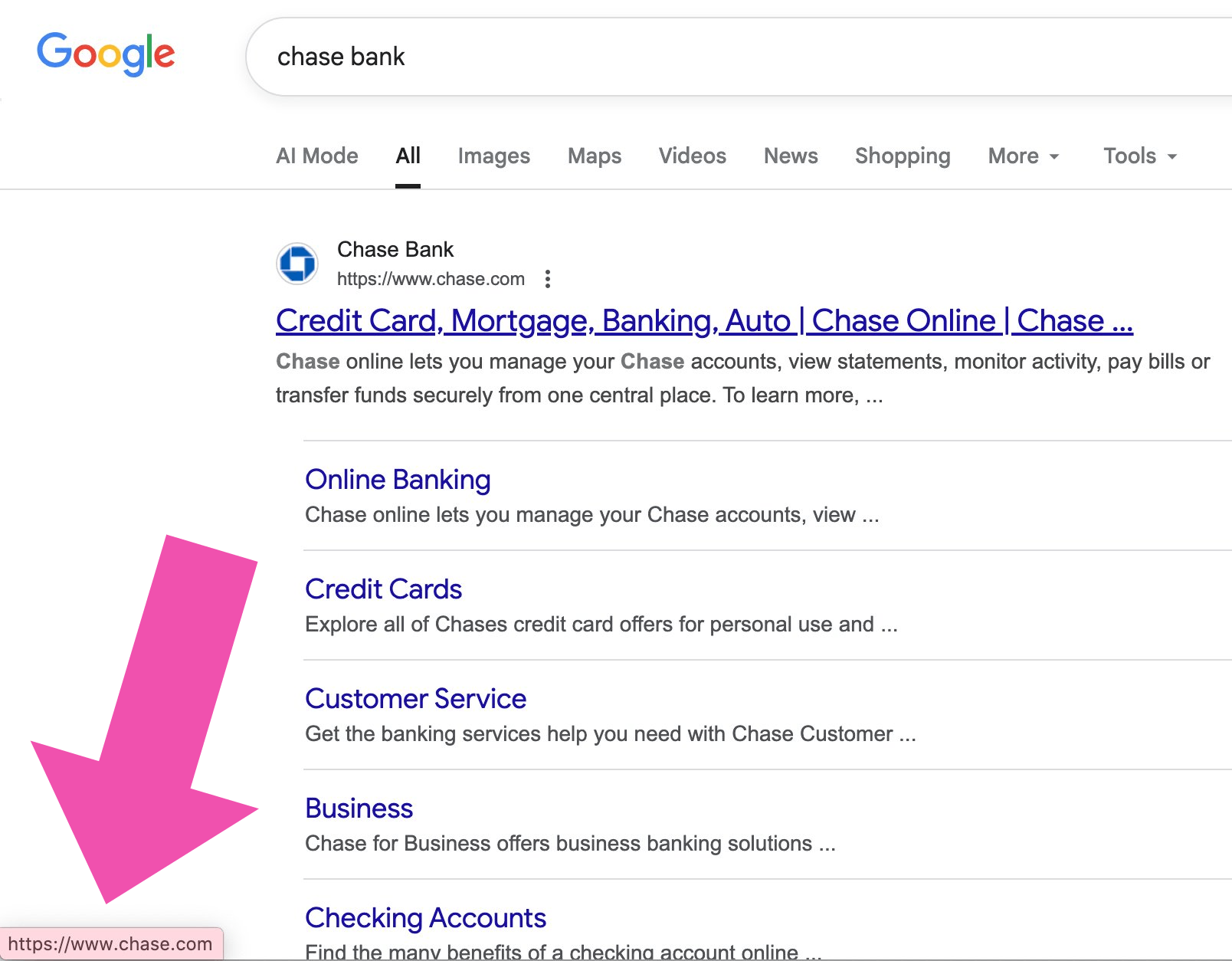
If you’re using a tablet or phone, pressing down on the link and holding without releasing will reveal the destination address on most devices. If you decide the link is not safe, lift your finger without clicking. (This sounds complicated, but is actually quite easy once you do it a few times.)
If there’s anything even slightly suspicious about the destination website address, it’s best to do more research before visiting it.
Know the real website addresses.
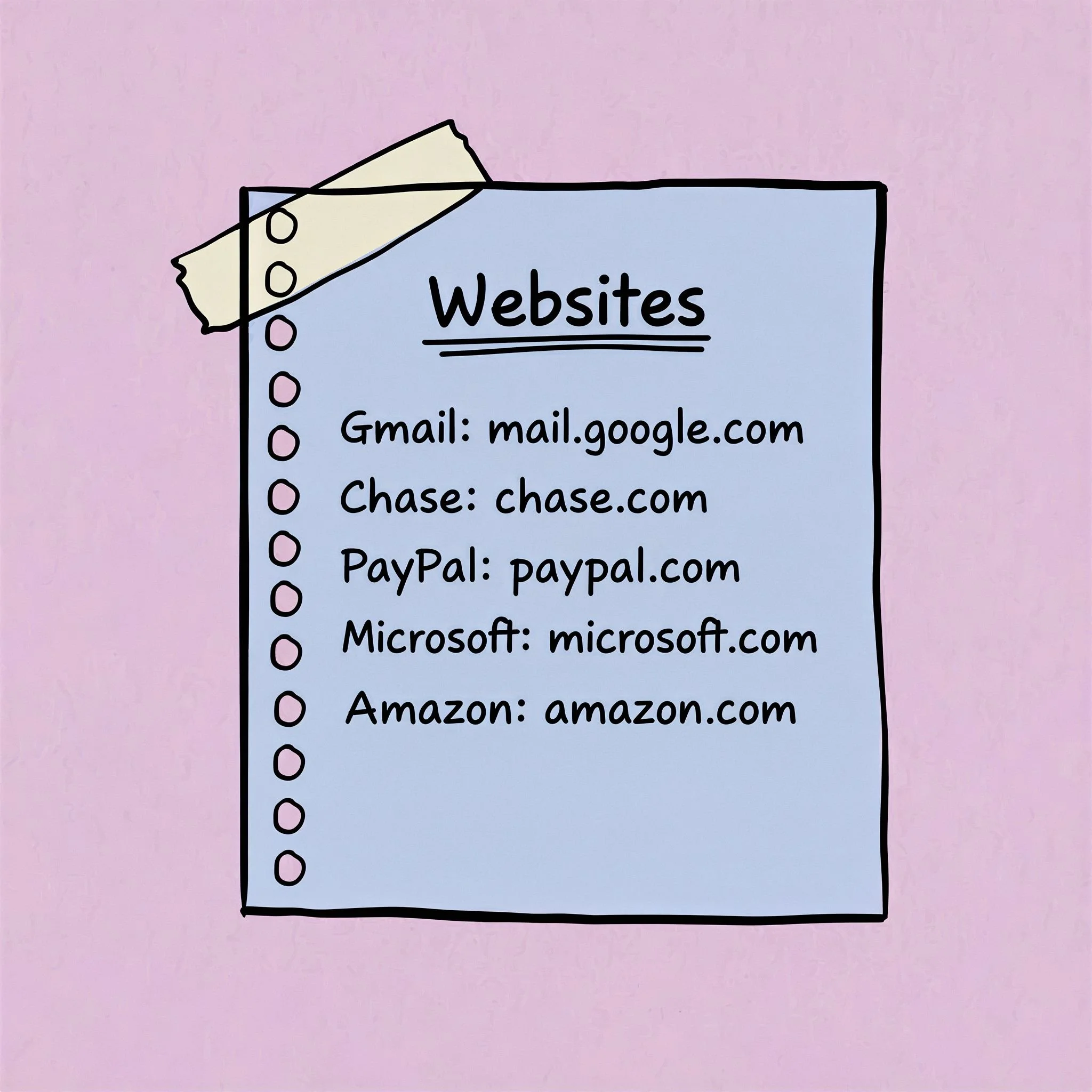
Instead of Googling company names and clicking on links, bookmark the sites you use often by adding them as favourites. You may also want to write the website addresses down in a physical notebook. Then if you lose your bookmarks (as sometimes happens during system updates), you’ll have a backup.
Don’t click on Google links that say “Sponsored.”
Because scammers can trick Google into selling them sponsored links, it’s best to avoid clicking links that say “sponsored,” especially if you’re planning to buy a something on a website, or will be entering personal information.
Not all sponsored results are scams of course, but because it’s so difficult to differentiate between scam results and authentic results, it’s best to avoid clicking them.
Remember: Someone paid Google for the “sponsored” link. The money is why Google is showing it to you first. Google has no clue who is on the other side of the link. It could be Mother Teresa or Jack the Ripper. That’s why I always scroll past sponsored links and look farther down the page for results without the “sponsored” tag.
As we discussed, scam sites can appear in Google’s organic search results too, so it’s still important to check website addresses, but it’s more likely that organic results will be authentic.
Install an adblocker.
It’s worth noting that the FBI issued a press release in late 2022 recommending the use of adblockers for protection from scammers. Since then, scamming has increased exponentially, so installing an adblocker is even more important in 2025.
Pros: An adblocker should remove most of Google’s sponsored ads from search results, which cuts off a dangerous scam entry point. Adblockers can also help protect you from “Your computer is infected” pop-ups and stop you from stumbling onto all kinds of sketchy sites.
Con: Installing an adblocker may make it more difficult to access content on sites that rely on ads for revenue, including most news sites, but you can customize your adblocker to allow ads in these scenarios. (It’s very easy to do.)
In my opinion, today’s internet is virtually unusable without an adblocker. Not having one is the digital equivalent of wearing a huge diamond ring in a high-crime neighbourhood. If you want to try one out, but aren’t comfortable setting it up yourself, consider paying a service like Best Buy’s Geek Squad to do it for you. It’s really worth it.
Listen to your browser’s warnings.
If you see a message from your browser telling you that the site you’re trying to visit is not secure, or that something you’re doing is unsafe, it’s best to stop what you’re doing. You might be trying to download a file with malware in it. You might be about to visit a scam site. You browser is designed to protect you.
Update your browser and operating system.
It’s important to use the latest version of your browser and operating system. Updating your browser and system on a regular basis (you can set your updates to automatic if you want) will help protect you from all kinds of security issues, including some scam attempts.
Say no to website notification requests.
If a website asks you for permission to allow notifications it’s best to say no every time. I recommend changing your browser settings to automatically block these annoying, distracting (and potentially dangerous) website notifications. If you encounter a scenario where you want notifications (for example, I turn them on when live bidding on auction sites), you can allow them just for this site.
Watch out for fake warnings.
Some malicious websites use stress-inducing pop-up warnings that say things like “Your computer is infected!” to scare you into calling scam tech support numbers or downloading dangerous software. These fake warnings are designed to look like browser or system warnings to maximize the fear factor. Try not to panic if this happens to you. Your computer is not infected — yet. But it will be if you call them.
If one of these pop-up explosions appears on your screen, don’t click any buttons or links. Try to close your browser window. If you can’t figure out how to close it, use Task Manager on Windows (press and hold Ctrl + Shift + Esc) or Force Quit on a Mac (press and hold Command + Option + Esc) to shut down your browser. Or simply turn your computer off and restart it (without restoring the previous session tabs in your browser). Installing an adblocker should stop these fake warnings from appearing in the future.
How to find real customer service numbers
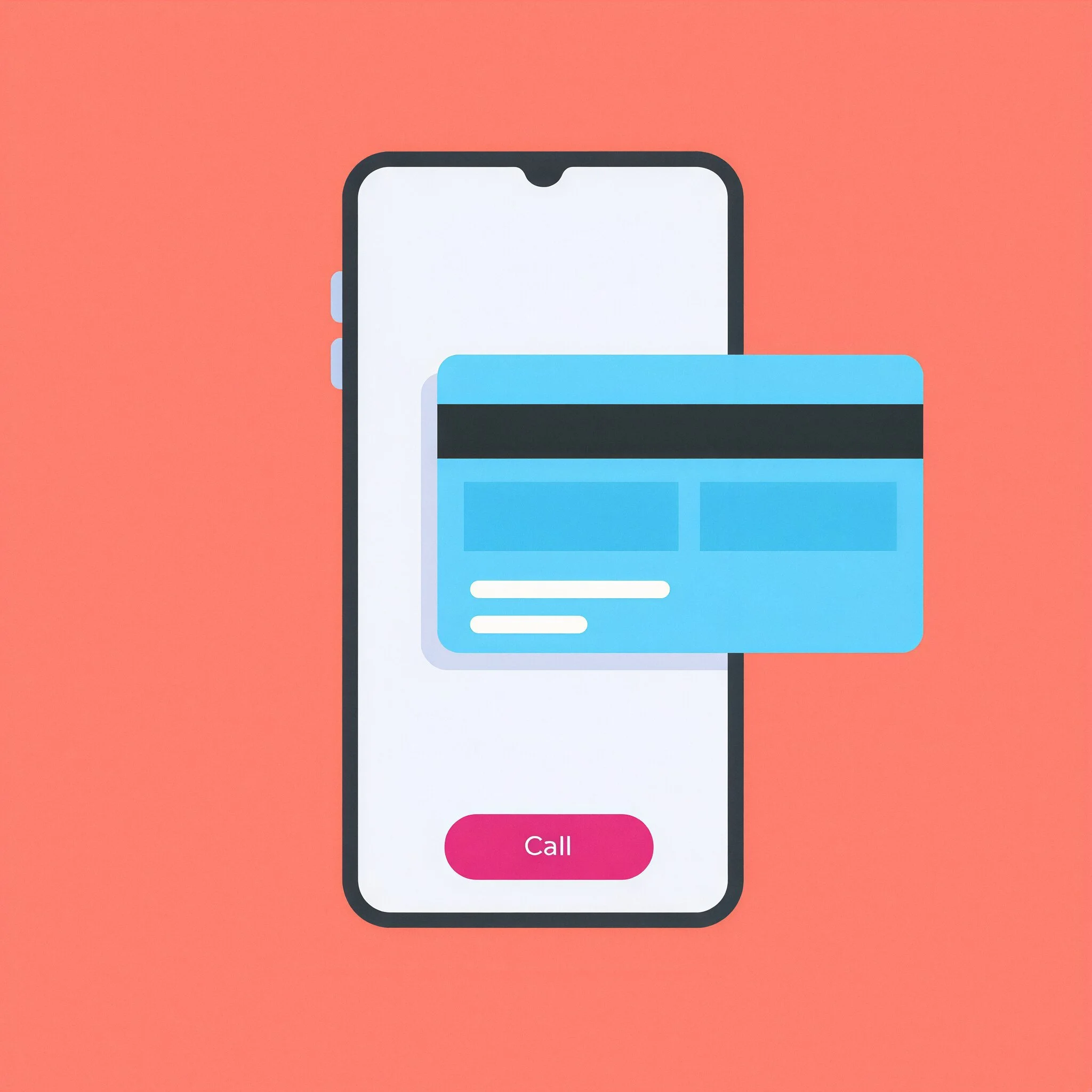
If you’re calling your bank, financial institution or credit card company, use the phone number on the back of your card.
The back-of-card number is the only number you should ever call.
If someone calls from your bank, tell them you’ll call them back, then hang up and call them using the number on your card.
This one action will protect you from so many scams.
Some other suggestions
Start a collection of business cards from companies you transact with.
Develop a habit of manually calling the numbers on these cards instead of searching online and linking to dial. If the numbers are too small to comfortably read, transfer them to a physical notebook. If you want, you can use the notebook for website addresses and passwords too.
If you don’t have the company’s number written down or on a physical card, look for it on the official website.
If you’ve already set up a bookmark for the website, that’s the best way to get there.
If you haven’t set up a bookmark, but you know the official website address, type it directly into your browser.
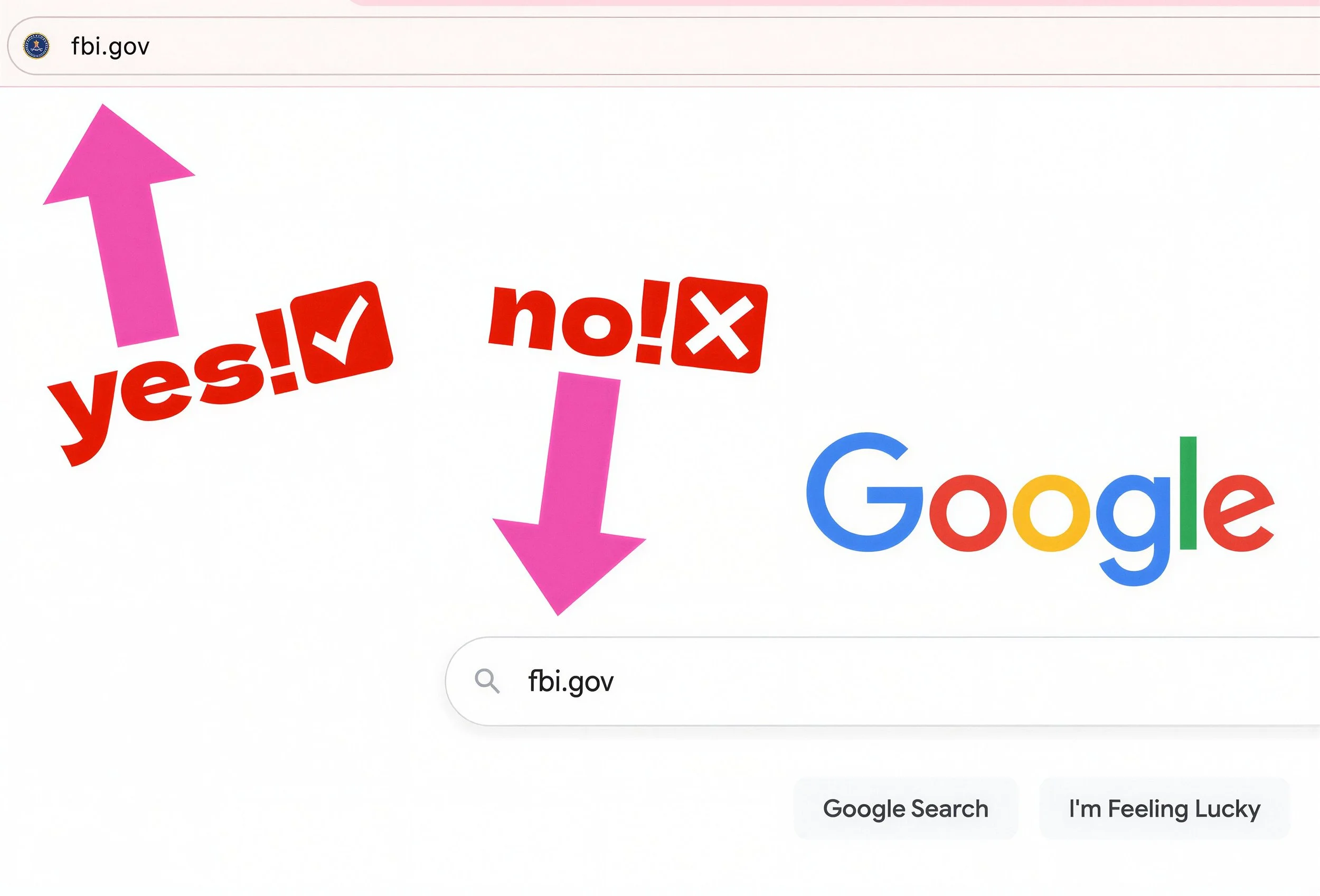
If you have Google set as your home page and you’re in the habit of typing website addresses into the Google search bar instead of into your browser, please break this habit.
Typing the website address into Google and clicking a link introduces risks, especially if you don’t have an adblocker.
If you have to use Google to find a number, search only the “Company Name” with no extra words.
As we saw earlier with our Geico example, it’s extremely risky to search “Company Name” with additional terms such as “customer service,” “phone number,” or “tech support.”
As always, avoid clicking on “sponsored” results.
Assess the search results before you click.
Ideally the official website appears first or high up in the organic search results (the results without “sponsored” tags).
The official website might show up with a “sponsored” tag too, which is totally fine. So if you see two links to the official site (one sponsored and one not sponsored), it’s all good. Just make it a habit of clicking the result that doesn’t say “sponsored.” (Not because it’s dangerous to click the sponsored link in this scenario, but because it’s good to establish this habit as a best practice.)
Check the website address.
If you see a search result for a supposedly official site that has missing or additional letters, strange spellings, hyphens, numbers, extra periods, or uses a suffix that is not .com or specific to your country, it’s best to pause and assess. I know it’s not easy, but try to train yourself out of the habit of searching, then clicking instantly.
Be paranoid about hyphens.
Nothing against hyphens (I’m a big fan) — you just don’t want to see them in your website addresses. Not all website addresses with hyphens are scams. But many are, so it’s smart to take out your magnifying glass in these situations.
How people get tricked: Many users intuitively feel that a site like shop-apple[.]com is an official Apple site because the “apple” is on the left of the “.com”. They see “shop” as some kind of sub-domain created by Apple to allow users to link directly to the Apple store.
Unfortunately, this intuition is wrong.
When a site has hyphens, the hyphens are part of the website address. So, in this case, the full website address registered by the owner is shop-apple[.]com not apple.com. Due to the way website address structures work, if the hyphen in this example was a dot, it would be a legitimate Apple site address with a “shop” sub-domain. In fact, shop.apple.com is a legitimate link to the Apple store. In this scenario, the full website address is: apple.com. And “shop” is a sub-domain of apple.com. The dot matters.
If there is a center dot in the website address, be suspicious.
When a company name is positioned to the left of a center dot (as we saw in apple.getsupport[.]com), the probability of this being a scam site is close to 100%. The real website registered by the owner in this example is getsupport[.]com and has nothing to do with Apple. The site owner simply added “apple” as a sub-domain, which anyone can do.
Site owners can also add multiple sub-domains. Let’s imagine a scenario where the owner of getsupport[.]com adds two sub-domains: “apple” and “com”. Now the site owner can use apple.com.getsupport[.]com to impersonate Apple. This is one of the top ways scammers lure victims in. Do not click!
Also check the part of the website address that comes after the final dot.
Official websites for large corporations usually (but not always) end in .com or the official suffix for your country (.ca for Canada, .uk for the UK, etc.). If the suffix is different, the site could be official, but proceed with caution. For example, a website that ends in .xyz has a high probability of being a scam site.
Once you’re on the official website, check (and double-check) the address in the browser to make sure it’s the official site. Then look for Contact, Help, or Support and call the customer service number.
Don’t trust phone numbers AI gives you
AI can be fun to use in all kinds of situations, but AI makes mistakes. So it’s best to avoid Google’s AI Overviews and AI Mode (as well as AI chatbots like ChatGPT) when you’re searching for phone numbers.
Think of AI as your friend who says outlandish things with such a high degree of confidence that everyone believes him. He’s fun to hang out with, but he needs to be fact checked.
AI companies don’t like to say that their chatbots make “mistakes,” so they use the more esoteric term “hallucinations.” These hallucinations can be significant. (For example, some users were told that it’s healthy to eat rocks. Others were advised to add glue to their pizza to make the cheese stay on.) Try to keep this in mind if Google’s AI or ChatGPT gives you a phone number. It could be a scam number, so it’s best not to call it.
I know I’ve already said this, but it’s worth repeating since it’s so important: a company’s official website is the only safe place to find a phone number online.
Even if AI-generated numbers are correct 99.9% of the time, it’s still a bad idea to trust them. If you’re calling a coffee shop to see if it’s open, no problem. But if you’re calling a bank or any other business where you’ll be sharing personal information, the stakes are too high. That 0.1% can destroy your life.
Remember: If you use AI to find a number and end up on the phone with a criminal who tricks you into handing over your life savings, in most countries there is no way to get your money back. As unfair as this intuitively feels, it’s considered to be your fault.
The AI search situation might get better at some point, but it might also get worse once scammers figure out new ways to manipulate it. And the last thing I want is for you to get caught up in that.
And that’s all I have to say on the topic.
Time for tea! Hope you have an amazing day.
Love Auntie Scam